What is location tracking?#
Location tracking is the ability of a device, an application, or a digital service account to collect your data about multiple things including your physical location. This tracking happens in real time or can be stored as a history over a period of time depending on your settings for the device, app, or account. As a result, people may not realize how much information they are sharing or how that information is being used.
Why location awareness matters#
Location data does more than show where someone is at a given moment. Over time it can reveal patterns like daily routines, frequently visited places, or personal relationships. Spending just a few minutes reviewing location access on a phone can help reducing risk.
Android: Phone settings#
This section focuses on location tracking that originates from Android phone settings.
Reviewing location settings on Android#
Checking whether location services are enabled#
On Android devices, location services control whether the phone can determine and share its location. To check this:
- Open Settings
- Select Location
- Check if location is ON or OFF
- Review which apps have location access
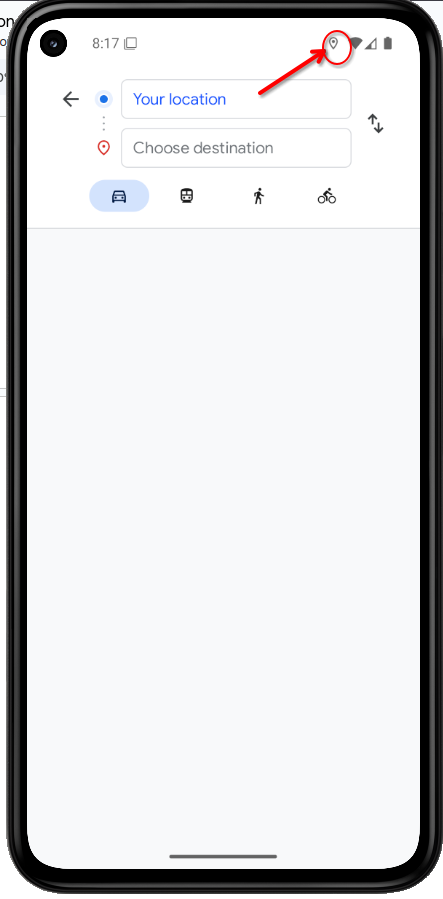
Android phone displays an icon when location is actively being used (usually a map pin/target in the status bar when an app is actively using your location)
Check Find My Device#
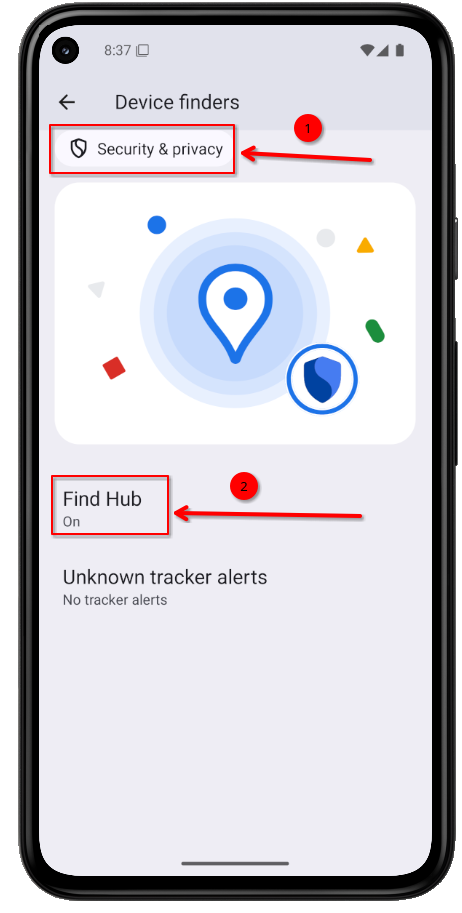
- Open Settings
- Tap Security & Privacy
- Tap Device finders
- Check Find Hub status ON or OFF
- If ON, verify which Google account it’s connected to
What to look for:
- Whether Find Hub enabled
- Which Google account it is connected to, especially if the account is shared
How to verify:
- Confirm whether Find Hub is ON or OFF
- Identify which Google account it’s linked to
- Take a screenshot and store it securely
Alternatively, Find My Device settings can also be reviewed through the Google Account settings page.